Needs planning in construction: from Excel to a clear overview
Needs planning answers a simple question: how many people—and which trades—do we need in each phase? Excel is often the first home for those numbers because everyone can open a sheet. The problem is not Excel itself; it is that demand lives in one file, availability in another, and the site team uses a third snapshot from Friday’s email.
This guide walks through defining needs clearly, when to move beyond static grids, and how filtering by trade helps you see overloads early. Along the way we look at Resursplanen because Swedish contractors often use it to enter needs per project and roll them up across the portfolio—similar ideas apply even if you use another system.
What “needs planning” should include
At minimum, tie each project phase to roles, not only headcount. “Six people next week” is weaker than two concrete carpenters, two steel fixers, and two general labourers—because trades are not interchangeable on site.
Once roles exist, add rough hours or crew-weeks per month. That is enough to compare against your bench of employees and regular subcontractors without pretending precision you do not have yet.
Where Excel starts to creak
Multiple project tabs, manual copy-paste between planners, and formulas that break when someone inserts a row are the usual failure modes. Version sprawl is worse: “final-v3_really.xlsx” rarely matches what the foreman printed.
If weekly meetings spend time reconciling files instead of deciding priorities, you have outgrown the spreadsheet as a system of record—not outgrown arithmetic.
Filtering trades instead of scrolling forever
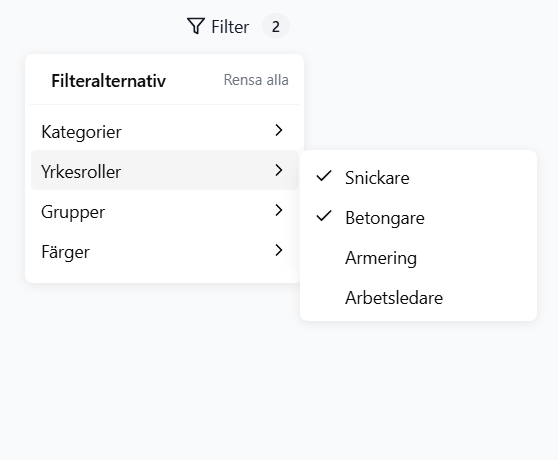
When the roster grows, you need views that hide noise. Filtering by trade group, certification, or internal category keeps the plan readable. The screenshot above illustrates that idea: pick roles such as carpenter or concreter and focus only on those allocations.
In Resursplanen, filters for categories, trades, groups, and colours are built for exactly this—so planners can narrow hundreds of rows to the slice they are negotiating in the morning meeting. The goal is the same in any tool: make the answer visible without rebuilding the sheet.
From needs to decisions
Good needs planning still leaves trade-offs: pull a crew forward, extend a phase, or hire. The win is that those trade-offs use one shared picture of demand. Export to Excel when finance wants a pivot table—but avoid editing the official plan only in Excel if the field does not see updates.
If you are evaluating software, test whether entering needs per project and viewing roll-ups is faster than maintaining your current matrix. That is the bar Resursplanen and similar tools aim to clear.
Learn more: resursplanen.se