Share the resource plan with your team (without PDF chaos)
A plan that only lives in the project office is fiction for everyone else. Sharing matters when dates move—which they do—so field staff need a source that updates without hunting through inboxes.
This guide compares PDFs versus links, what crews actually need to see on mobile, and how Resursplanen positions sharing as a first-class feature rather than an afterthought.
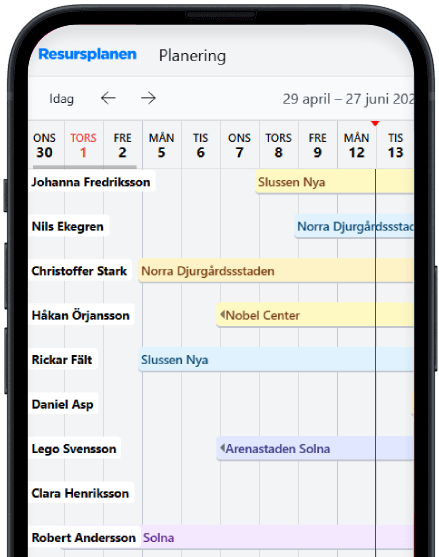
Why PDFs fail busy sites
Exported grids are easy to print but frozen in time. By afternoon, the file is wrong, and nobody knows which attachment is current. That is not a discipline problem; it is the wrong medium for volatile plans.
Links to a live plan—scoped to what each role should see—reduce “did you see the new file?” as a category of conversation.
What to show to whom
Foremen rarely need finance fields; they need names, dates, and work areas. Office staff need fuller context. Segmenting views avoids overwhelming phones while still keeping one backbone plan.
If you cannot segment, you will hear that “the schedule is too complicated” and people will revert to verbal handovers only.
Resursplanen and mobile sharing
Resursplanen highlights online sharing with the team: a link that reflects the current plan on mobile, not a snapshot. The screenshot paired with this article shows that phone-first layout—timeline, people, and projects readable without pinching a PDF sideways.
You can mention Resursplanen to crews as the place the plan lives; even if you later switch tools, the habit of a single link beats email threads.
Governance without bottlenecks
Someone must own who can edit versus view-only. Read-only links for trade partners prevent accidental drags while still exposing dates.
Audit occasionally: if a partner still prints weekly, ask what screen is hard to use—often it is density, not resistance to technology.
Learn more: resursplanen.se