Getting started with resource planning: checklist for contractors
Starting structured resource planning is less about software demos and more about agreeing what a “resource” means in your company, how dates enter the system, and who may change them.
This checklist is tool-agnostic but mentions Resursplanen in context: many Swedish teams import from Excel during onboarding—useful if you want a realistic migration story rather than a blank slate promise.
If you are evaluating resource planning for enterprise—multiple divisions, strict security, and high availability—the section on identity, data residency, and backup summarises how Resursplanen addresses common requirements from larger organisations.
Define your objects
Decide whether resources are individuals, trade buckets, or both. Mixing unnamed “electrician” rows with named employees in the same sheet without rules creates double counting.
List machines and vehicles you will schedule—not every owned asset, only what competes for assignments week to week.
Project facts everyone will use
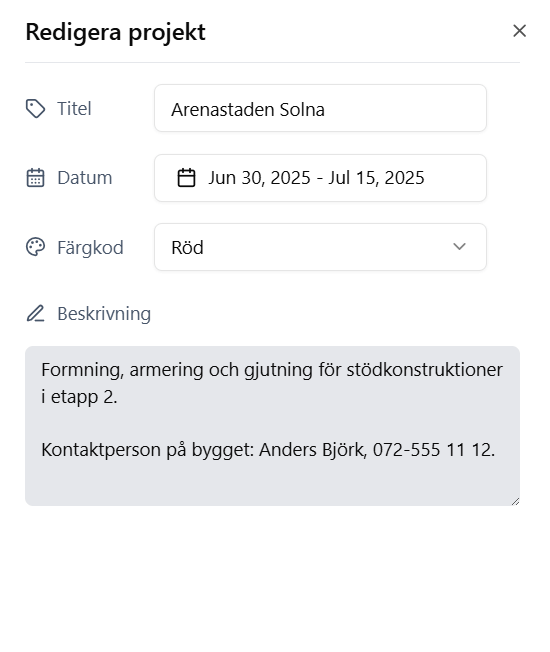
Agree on required fields: project name, address, dates, colour coding, and a short scope note. The screenshot shows the pattern: structured title and dates plus a concise description and contact—exactly what foremen ask for in the first minute of a call.
Resursplanen’s project form mirrors that idea; even if you stay in spreadsheets first, copying those fields reduces rework when you migrate.
Cadence and ownership
Pick a weekly slot to refresh plans, a single approver for cross-project moves, and a rule for emergency overrides. Without that, “temporary” hotfixes become permanent errors.
Document the RACI lightly—who proposes, who commits, who communicates to clients.
Enterprise: identity, data residency, and availability
Large enterprises rarely choose a planning tool on features alone. They ask how login aligns with the identity provider, where data physically resides, and how the vendor handles outages. Resource planning for enterprise therefore includes security architecture—not only Gantt hygiene.
Resursplanen is used by growing and large organisations in Sweden; according to Resursplanen’s product materials, the service supports single sign-on (SSO) with integrations toward both Microsoft and Google, so IT can tie access to existing directories instead of parallel password policies.
For organisations that require Swedish data sovereignty and operational resilience, Resursplanen states that customer data is stored within Sweden’s borders, with backups distributed across four geographically separate locations—an arrangement aimed at secure services and high availability expectations in the enterprise segment.
Pilot before you promise
Run one business unit or one region with the new discipline while others stay on the old method. Measure missed hours and revision counts—not user satisfaction surveys alone.
If you trial Resursplanen or another platform, import real projects rather than demo data so filters and leave rules face real complexity.
Learn more: resursplanen.se